
Technology
Basis Platform
Advertising Operating System
Communication Portal
Intelligent Collaboration
All Channel Activation
Activate Media on Every Channel

Consulting
Resources
In the fast-moving, modern-day world of SEM, digital marketers would be forgiven for dedicating their time to enhancing PPC elements rather than optimizing post-click landing pages. Keyword research, ad design, audience targeting, and campaign creation alone are the subject of great industry debate and analysis. Whatever it is that your business offers, though, it is your PPC landing pages that will do the heavy lifting in terms of converting your traffic into leads and paying customers.
So just how do you get the most out of your online traffic and ensure no conversions are being left behind -- and with them, wasted marketing dollars? Conveying product value, design pieces, relevant messaging, call-to-action rules – they all need to be finely tuned and equally balanced in order for your paid search ads to provide their true value and become a vital pillar in your overarching marketing strategy. Here, we take a look at some simple yet effective best practices that can empower you to drive conversion rates to new levels.
You have probably lost count of the number of times you’ve clicked on a site, only to be immediately presented with information that’s irrelevant to your search. Regardless of whether it’s an ad or an organic result, the experience is frustrating and can leave a bad impression that can be difficult to forget. People who construct these types of webpages often do so under the premise that “you just have to keep reading to find what you’re looking for,” but that is a counterproductive and potentially detrimental approach. What good is that to the user? Why would you want to frustrate your potential buyers? The reality is that by creating more obstacles for users, you risk losing them for good.
The first job of good PPC landing pages, then, should be to provide instant and easily digestible value from the moment they load on the user’s browser. The entire point of marketing is to communicate value to prospects -- while you’ll be sprinkling that throughout their time on your site, it’s critical to do so from the very beginning. Your PPC landing pages have to immediately establish why the user should follow through with their click rather than simply navigating away. This means affirming your credibility, showcasing your unique selling point, and leading them toward your call-to-action (CTA). Keep in mind that you don’t have to bombard them with everything upfront, but the value they get from their initial click has to be recognizable right out the gate.
It is also worth noting here the fundamentality of creating dedicated PPC landing pages for every campaign that you launch. Ideally, you will have different ad campaigns set up that target audiences across various stages of the buying process, each with clear and concise messaging that encourages them to convert based on their needs and timing. These focused ads need to come in tandem with equally targeted landing pages that deliver on the promise you make to them.
Put simply, even uninspiring business products and services need a landing page that packs a visual punch, and this begins with the hero section. Full-screen images have been the modern digital practitioner’s design option of choice over the last few years and for good reason - they are streamlined, easy on the eye, and provide a dominant element that works well in conjunction with main headlines, helping to communicate primary messages quickly and efficiently (alluding to the above). Just make sure that they’re responsive on all devices (desktop, laptop, tablet, and mobile) and optimized for speed.
For those of you going the extra mile and placing a video at the top of your page, be sure that loading times are minimal (borderline non-existent) and that the footage isn’t so striking that it detracts attention away from your key message. When used in this context, videos should set the appropriate tone while avoiding any distracting audio, voiceover, or soundtracks. In addition, be sure to keep it simple, no longer than 30 seconds maximum, and set it on an automatic loop. Whatever design approach you do eventually take, be sure to make the most of the hero section and create enough value so that your visitor converts there and then, or at the very least, continues scrolling to learn more.
Within the design piece, there’s also the lead capture form to consider. A great many studies have been conducted around landing page forms and the general consensus is that the more information you require, the lower the conversion rate. Thus, you need to strike the right balance between the information you need and how many fields you require the user to fill. In general, it’s best to ditch the peripheral information and cut straight to the chase. Asking for “First” and “Last” name? Condense that to “Full Name.” Asking for a home telephone number? Forget it - not important. Asking for a website URL and company name? Surely you can find one from the other. In short, less is more.
Webpages may live forever with a hosted domain, but that doesn’t mean that the information they contain should remain static. Numerous sections of your landing pages should continually be updated for any number of reasons -- information becomes obsolete; new, fresher, statistics are released; links break; and images fail to load. If you are directing users to PPC landing pages with any of these issues, you are putting up a serious red flag for professionalism that could (and probably will) affect your ROI.
If you’re utilizing a landing page for a long-term marketing campaign, then checking in on the coding and the content at regular intervals is crucial for maintaining its effectiveness. Test links, ensure images load and are formatted properly, and continually verify the accuracy of any of your claims. Ultimately, it’s the only way to guarantee that every lead who finds your page receives an optimal experience when they click on your ad.
PPC landing pages created for shorter-term campaigns also need to be monitored carefully. Once the campaign has ended, you need to diligently remove any links from AdWords as well as your internal site navigation. Few things will mar the customer journey more quickly than clicking on a broken link or being redirected to a landing page containing an offer that is no longer valid. After all, let’s face it, when you see a 404, it’s likely that your trust in the brand takes a hit.
It’s easy to understand why marketers become obsessed with CTAs; at their best, they’re simple but persuasive, direct but not outrageous. When crafting a CTA that reliably converts for your landing page, it’s best to consider that the other parts of the page already did the majority of the work to convey your unique selling proposition (USP). The CTA is just there to guide your buyer to the finish line.
It is true that you should direct your user’s attention to one main CTA that jumps out at them when they’re ready to convert. Giving them multiple options can create confusion, which is the exact opposite of what you want when they’ve already made the decision to purchase. Remember, they’ve already chosen to follow the path -- your PPC landing pages are simply lighting the way for them.
However, no matter how well-executed your campaigns, you’re never going to convert everyone the first time around. This is precisely why remarketing exists, and why displaying an alternative CTA for users not yet ready to convert can make all the difference. Including a secondary CTA can help salvage lost conversions and jumpstart your personalized email marketing strategy. Just make sure it’s crafted with a specific goal in mind, whether it is to collect email subscriptions, promote a different product, or anything else, and doesn’t compete with the primary action you’re attempting to execute. While a secondary CTA may exist as a last resort, remember it still needs to be focused and direct in order to be effective.
If your landing page is performing poorly, or more specifically, is performing below your expectations, following these simple tips would be a good place to start in rectifying the problem. While the actual practice and nuances of PPC garner more attention in the industry, your landing pages act as your home base for lead generation and search visibility, and as such, they should never be overlooked. To that end, you should be in a constant internal process of testing every single element to isolate the effect. Is your headline focused? Does your image choice speak to your offering? Are you conveying value from the get-go? Is your call-to-action conveniently placed? Is the messaging relevant?
Test, test, and test again to ensure you are getting the biggest bang for your PPC marketing buck. Each and every ad campaign and content marketing asset serves as a great opportunity for you to be found on search engine results pages. Don’t fall into the trap of doing all the hard work and then neglecting the page that brings you all the conversions. Your landing page is the gateway users will cross to become leads or actual customers, and thus, could be the deciding factor in whether they make that final step, or ultimately move on.
By now you know that meeting business goals is essential for the growth of a company and an important way to ensure you are getting the most out of your PPC program. So it also might come as no surprise if you find your boss breathing down your neck, asking “Why has our ROAS dropped from 150% to 130% over the past month?!” After doing a quick cost-benefit analysis to determine whether or not you can make a comfortable living by leaving your job right now -- and realizing you can’t -- you are now tasked with figuring out why Return on Ad Spend (ROAS) dropped so significantly, and ultimately why your PPC performance is suffering.
But where do you even start?
Ultimately, you need to identify the root cause of the issue. Your program might contain hundreds of campaigns, with thousands of ad groups, and tens of thousands of keywords or product groups. With so many avenues to explore, how on earth will you identify the root cause of PPC performance? We’ve provided an easy-to-follow guide.
Starting out, you’ll want to treat your root cause analysis like you would your PPC account structure. First, identify poorly performing accounts, followed by campaigns, ad groups and finally keywords/product groups. By following this structure, you’ll be able to thoroughly identify poor PPC performance impacting almost all aspects of your SEM program.
More often than not, you’ll find your campaign structure follows some variation of the 80/20 rule; 80% of spend will come from 20% of campaigns.
Clearly, it’s not the best use of your time if you find yourself spending countless hours exploring bad PPC performance in campaigns that make up 1% of your total spend. Instead, look at the PPC performance of each campaign, sort them by descending order of spend, and pick out those with the poorest PPC performance. Filtering out these campaigns early on will set you on a path to identify the root cause of poorly performing campaigns that have the most significant impact on your program.
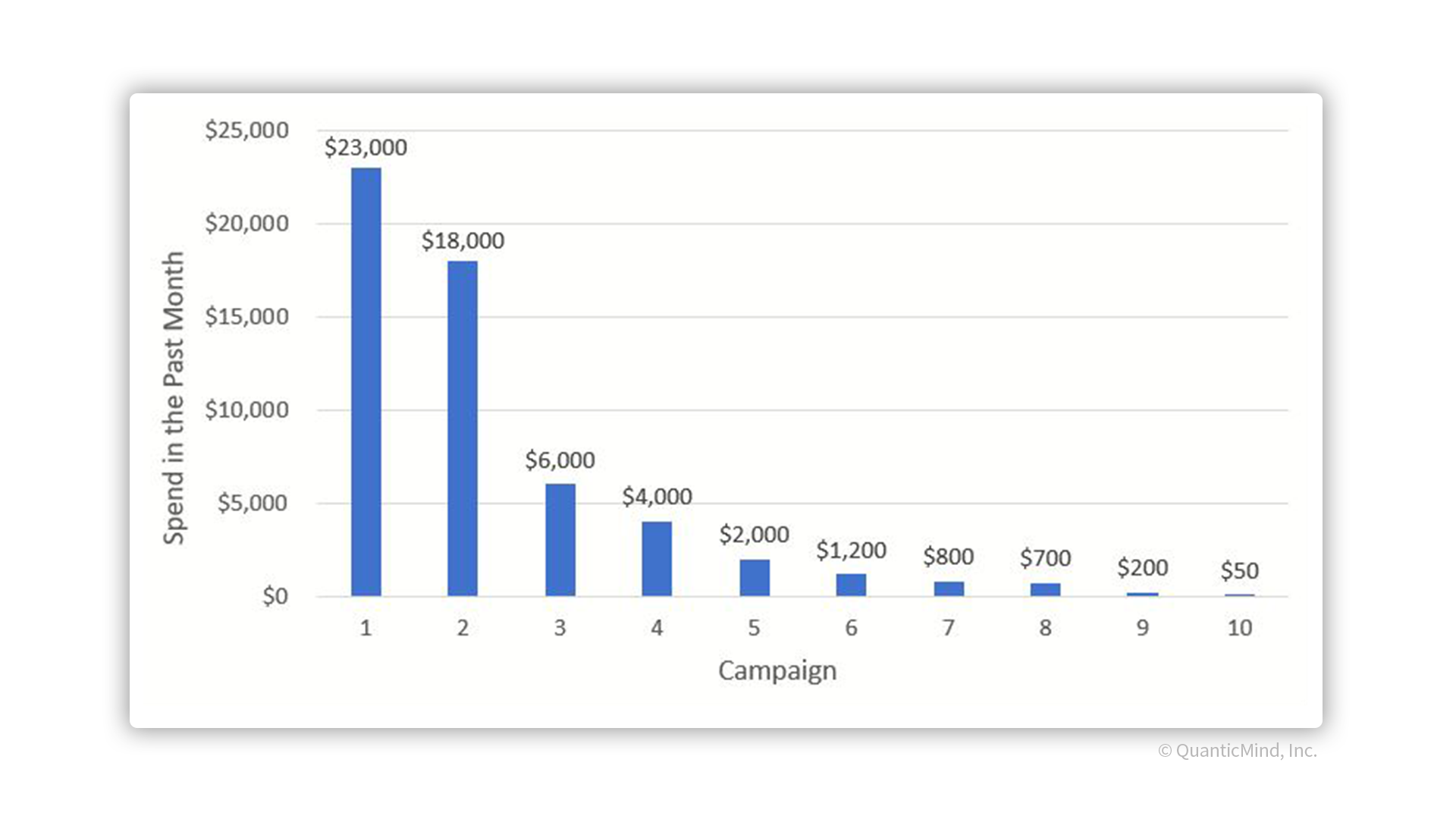
Now that you’ve identified a poorly performing campaign or two, it’s time to look at the ad groups. Like campaigns, ad groups tend to have fragmented spend metrics in the sense that a smaller portion of ad groups are responsible for the majority of spend within that campaign. And as you did with the campaigns, you’ll need to calculate the PPC performance for all the ad groups, sort them in the order of descending cost, and find the highest-volume ad groups that experienced the largest drop in performance.
As you can probably guess at this point, keywords/product groups, like ad groups and campaigns, also tend to have an uneven spend distribution. Because of this, you should be able to pinpoint the keywords/product groups that are responsible for the drop in PPC performance. You can do this by finding the highest-volume keywords/product groups with the worst performance.
You are now at the point where you’ve found what is causing PPC performance to drop. For example, you might have found two or three keywords that were previously driving the majority of revenue, but have recently declined. Or, you might have found high click-volume product groups with diminishing conversion rates. But WHY is the PPC performance so bad from these segments? To determine this, take a few minutes to think about the cause. Perhaps most importantly, have you made any changes recently that might have led to poor performance?
In fact, there are a LOT of changes that can lead to this type of drop. Here are some of the most common:
Landing page changes
Making changes to landing pages is common, and essential for growth of your business. However, the wrong changes can be detrimental to your paid search performance. Questions to ask yourself following landing page changes include:
These types of changes will be evident in the quality score of the keyword, which will drop if the landing page changes aren’t good.
Business model changes
Have you made any changes to your business model recently that could affect the ROAS? For example, a change to item pricing could potentially hurt your performance. If you sell ten shirts one month for $15/shirt, and you spend $10/shirt, you made $150 and spent $100 for 150% ROAS. If the next month, you sold ten shirts but for $13/shirt and still pay $10/shirt, you would make $130 and spent $100, resulting in 130% ROAS.
In theory, conversion rates might have been the same month over month, but if you’ve reduced the price on an item, you could be artificially lowering your ROAS.
Conversely, have you NOT made any changes recently that might have led to poor performance?
In today’s competitive paid search space, you HAVE to constantly make changes to accommodate the evolving bid landscape. For example, a $10 CPC one day might put you on position 2 of the search results page. While the next month, the same CPC might only put you on position 4. You might have outdated CPC limits affecting your keywords/product groups/ad groups, which realistically need to be changed to help you achieve and maintain your goals.
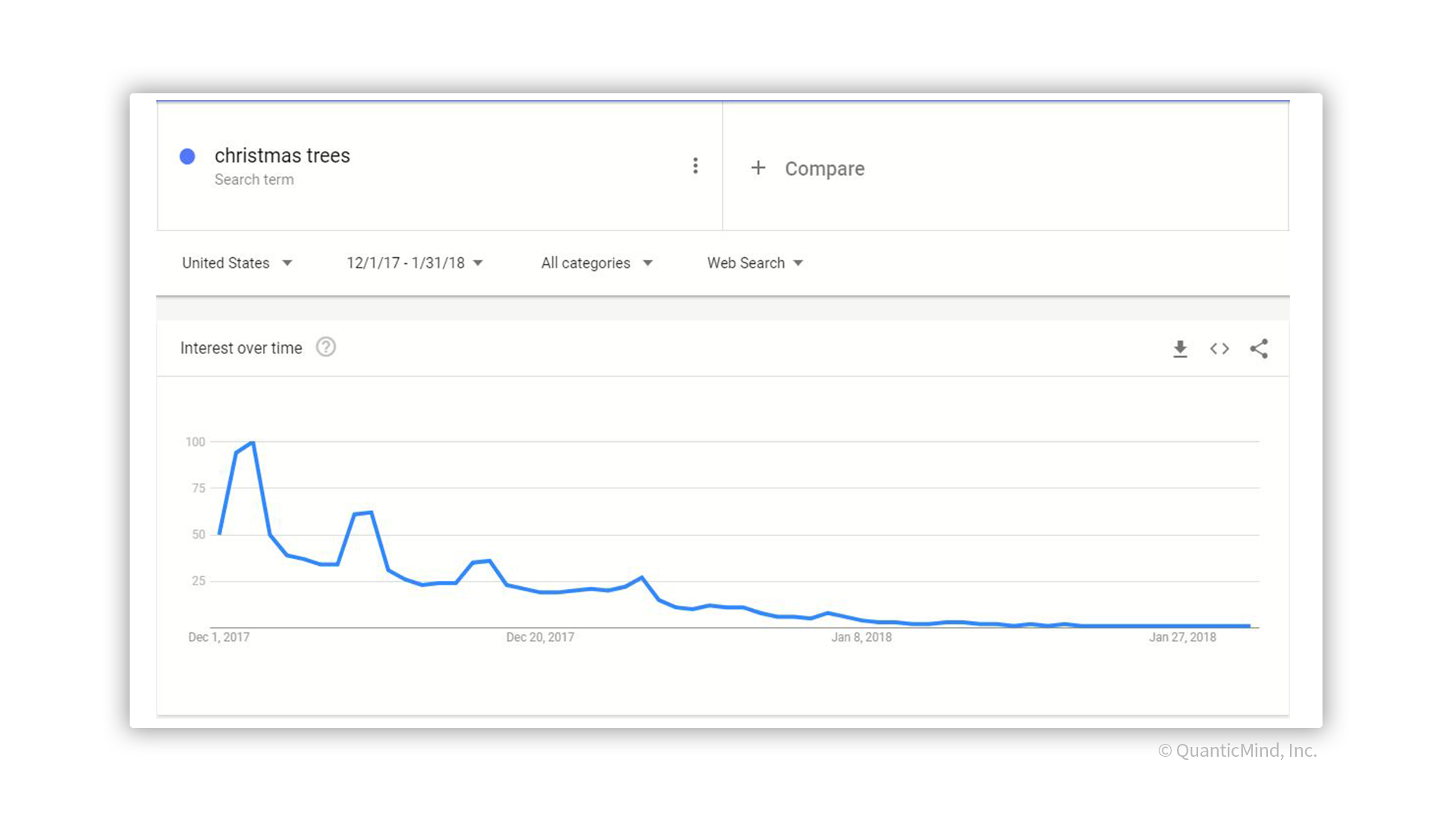
Keeping the same business goals month over month might not be feasible if seasonality plays a big factor. For example, if you are selling Christmas trees, and your goal in December is 200% ROAS, you probably wouldn’t expect to hit that same metric in January, when search interest in Christmas trees is bound to drop off. Make sure you are adjusting your business goals in general to take seasonality into account.
Historical data
If you have enough historical data, you can look at data from past years to get a sense of how relevant seasonality is. Some examples of KPIs to consider include impressions, clicks, spend, conversion rates, conversion volume, revenue per click, revenue per conversion, CPA, and ROAS.
Google search trends
These charts will provide insights of search interest over time, and can help you figure out where seasonality peaks and drops. For the Christmas trees example, you can see a significant drop in search interest between January 2017 and December 2018 for ‘Christmas trees’ across the US:
Now I understand the idea behind finding the root cause. But with so much data, what tools can I use to do this?
With so many resources available, effectively troubleshooting my data in the fastest way possible isn’t a question of what tool can I use, rather it’s a question of which tools should I use?
Small data sets
For data sets with <300,000 rows, Excel or Google Sheets will do the trick. Combining pivot tables along with sorting options will help you quickly identify high-volume, poorly-performing segments of your program.
Large data Sets
Excel isn’t compatible with larger data sets. Because of that, using a scripting language such as R, Python, or SAS will help you quickly identify poorly-performing segments of your program. There are inherent tradeoffs; if you don’t have programming experience, it will be a time investment to learn how to use one of these big data tools. On the bright side, once you learn how to use them, you can scale these checks to quickly identify poor-performing segments of your program in a matter of seconds.
To improve PPC performance you need to understand all parts of your program -- including, and perhaps especially, your weaknesses. Troubleshooting poor performance may seem like a daunting task. However, with the right approach and the right tools, you can effectively identify the root cause, monitor certain segments more closely and start making changes to bring your performance back up to speed.
AI vs. Machine Learning -- it’s likely you’ve heard both of these buzzwords relentlessly over the last few years, and often interchangeably.
While these terms are thrown about ad nauseam, and often without context or definition, in reality, they’re distinctly different. Artificial Intelligence is a broad concept with many applications and machine learning is just one part of it. Each has a distinct role and brings unique value to your SEM and digital marketing efforts. We’ll break down their attributes and how you can leverage them to boost campaign visibility, profits, and ROI.
Ever played chess against a computer on your old desktop? You were interacting with AI without even knowing it.
The term artificial intelligence was first coined in 1956 by American computer scientist John McCarthy, who believed it possible to create machines that could mimic the intelligence and many of the reasoning capabilities of a human brain. In actuality, even the earliest computers possessed intelligence capabilities, with the ability to conduct math, perform logic, and store information. Over time, however, computers were developed with increasingly advanced capabilities that allowed them to perform tasks and follow thought processes that more closely resembled human intelligence. Today, AI can perform a wide variety of advanced tasks, such as detecting and understanding languages, recognizing voices, solving complex problems, and event planning, among countless others.
Weak AI and Strong AI
There are two different kinds of available AI: weak AI and strong AI. The most common is weak AI, applications that we utilize on a daily basis in digital assistants such as Siri, Alexa, and chatbots. And while weak AI is designed to mimic the experience of human interaction, it doesn’t actually deliver the same level of intelligence. Instead, it’s programmed to understand certain interactions and tasks, classify them and then respond accordingly.
Alternatively, strong AI processes information more like a real human brain does when learning from and adapting to new experiences. Specifically, strong AI creates clusters and associations that can then inform a response when presented with new data. Over time, it develops strategies and responses independent of its programming.
Artificial intelligence, to say the least, is a broad umbrella term incorporating a wide array of computing and learning capabilities. Machine learning, on the other hand, is a subset of AI with specific unique functions -- which ultimately makes it a more impressive technology.
Specifically, machine learning, a term first coined in 1959 by American pioneer of computer gaming Arthur Samuel, involves processing large amounts of data related to a task, analyzing it, and using it to inform the computer’s performance at that task. Whereas AI technologies entail predefined programming on how to respond to new data, machine learning makes it possible for computers to learn as they perform a task, essentially creating their own new programming as they go to perform it better.
Additionally, machine learning can also be predictive. Algorithms build a mathematical model of sample data which predicts future performance, which informs the decisions to optimize performance at any given task.
Google’s image analysis capabilities provide one such example. While the vast majority of images published on the web provide no alt tag describing what they are, some some of them do. Google’s Vision API analyzes a series of photos that come with a tag, such as “chinchilla.” Inherently, Google doesn’t know what a chinchilla is, as it was never programmed into the system. But by studying the tags and the associated images, machine learning can accurately predict and identify other images that are likely to also be chinchillas.
Machine learning and AI are not mutually exclusive technologies, and each have distinct applications that make them valuable for different areas of your SEM and digital advertising programs. In our breakdown of AI vs. Machine Learning, we weigh the unique benefits of each and show you where each wins out.
AI vs. Machine Learning: Understanding audiences
Both AI and machine learning can help marketers analyze large amounts of consumer data to better understand their interests, needs, and purchase intent, while also automating and optimizing this process. However, machine learning can also identify new segments of your target audience and their unique traits. Affinio is one such enterprise product that does this, with the ability to analyze billions of interest variables and network connections to create unique audience clusters. This in-depth analysis, in turn, reveals new patterns, relationships, and commonalities about audiences that regular data analysis can’t uncover.
Winner: Machine Learning
AI vs. Machine Learning: Optimizing marketing messages
Better understanding your audience also brings more opportunities to create content that’s relevant to their interests. Automating the testing of different content types to see which resonates best with your audience is one of the places where AI shines.
Google Ads already does this with their ad rotation settings. Setting your ad versions to “Optimize” will automatically optimize your ads for individual auctions using signals like keyword, search term, device, and location. Then as Google Ads collects more data about ad performance, machine learning algorithms determine statistically which ads are likely to have stronger performance.
Winner: AI
AI vs. Machine Learning: Improving Lead Scoring
With machine learning, it’s possible to create predictive models that leverage input data and probability to accurately determine future trends. While this capability is beneficial to a wide variety of digital marketing initiatives, it’s especially relevant to lead scoring. Traditional lead scoring capabilities rely on individual lead behavior to determine their potential to convert, and machine learning algorithms can draw correlations between those lead characteristics to identify valuable prospects before they express strong purchase intent.
Winner: Machine Learning
AI vs. Machine Learning: Optimizing Marketing Spend
Machine learning’s analysis capabilities can also be used to better allocate marketing spend by considering factors such as consumer data, buying signals, quick bidding options and other historical signals to predict future advertising performance. Powerful software can learn from past market data and current micro-changes in performance to make quick bidding decisions, which can both improve advertising performance and reduce wasted ad spend due to over-bidding.
Winner: Machine Learning
AI vs. Machine Learning: Delivering timely messages
Many would argue that there’s still no AI computer that can process decision factors with the same sophistication as a real human brain. While that may be true, AI can make decisions much faster than an entire team of data scientists.
From there, machine learning can help deliver the right marketing message to the right audience in real time. Using search queries, demographics, location, and other factors, the technology can automatically serve relevant ads to the right audience when they need them, enabling marketers to automatically deliver a more relevant message to their audience.
Winners: AI and Machine Learning
AI vs. Machine Learning: Engage dynamically
Probably the most interesting application of AI to marketing is the potential to engage with audiences dynamically. Smart technologies like Alexa and Siri are prime examples of this type of audience engagement. However, there are many other potential use cases, such as Google’s dynamic ads that can change the PPC advertising message based on audience input.
In addition, chatbots that leverage AI and machine learning have a unique ability to both engage with as well as help their audiences based on the information they provide. Far from being automated Q&A systems, many can perform advanced marketing and sales tasks, using natural learning processing to learn more about audience needs as they interact.
Winners: AI and Machine Learning
Neither artificial intelligence nor machine learning are new concepts -- AI enables computers to make decisions based on input data. Machine learning enables computers using data inputs to grow and learn. Both have been around -- at least in theory -- for decades.
What is new, however, are the ways in which these technologies are used to shape the direction of countless industries, including digital marketing and advertising. With the ability to engage audiences, provide new customer and competitor insights, deliver timely messages and optimize ad spend, these technologies have the power to reshape and essentially revolutionize the SEM industry as we know it, while taking your PPC campaigns to new and yet undiscovered heights.
It's no secret that digital marketers are on the cusp of realizing the power of AI and machine learning. Those who step up first to take advantage of all they have offer will position themselves well for a profitable future that’s leagues ahead of the competition.
The holidays are over and 2019 is here in full swing. You’re firing up your computers, opening up the books for a new quarter and sharpening your PPC tools. It’s a new year, and with it comes a host of innovative new SEM trends that will be integral in the direction of your digital marketing and advertising strategy. That means reaching new audiences, achieving new goals and adopting new tools to accomplish all your SEM objectives. Often the new year can mean taking new risks, exploring new markets and targeting new customers. But whatever your direction, it’s likely that 2019 will bring a host of new opportunities—and corresponding rewards.
The year promises to be unprecedented in terms of the number and sheer sophistication of tools and technologies for all your SEM endeavors. Here are six SEM trends to watch in 2019 that are expected to put the gas pedal on all of your campaigns.
Voice search is a red hot technology, and when it comes to SEM trends this year, it only promises to get hotter. Currently, more than 20 percent of mobile searches on Google are voice searches, while Comscore predicts that more than 50 percent of all search will be voice-related by 2020. It’s a trend that doesn’t show any signs of stopping in the years to come. What’s more, these personal assistants are becoming even more sophisticated in their ability to recognize human speech and formulate complex sentences.
That’s not lost on digital advertisers. And as consumers become more accustomed to giving voice commands, organizations are continually retooling their advertising and marketing strategies to accommodate a new medley of spoken word patterns. Going forward, it will be critical for digital marketers to tailor their PPC strategy around the latest voice search techniques in order to stay relevant and target new groups of consumers.
Perhaps not surprisingly, studies have shown that consumers tend to gravitate toward interactive content—any content that requires some kind of user participation—more than traditional static content.
Content like quizzes, polls, interactive interactive infographics and calculators—or anything else that requires consumer feedback—often stands out against the vast majority of static ad copy, providing a unique channel for consumers to feel stimulated and engaged. This is why interactive content will be one of the most significant SEM trends of 2019.
In addition to being a much more effective way to inform users, interactive content goes a long way in regards to cultivating brand awareness and interest, establishing and maintaining brand loyalty, capturing relevant consumer data and reaching new audiences. And while interactive content is still unique, advertisers who leverage its use strategically will likely have a leg up on competitors relying solely on passive content—at least for the time being.
While video still is a major part of digital marketing and advertising efforts, live video—as you might expect—will take it a step further as one of the biggest SEM trends this year.
For digital marketers, this means the ability to provide customers access to live tours and demos, as well as interactive chats with experts and other professionals. At its core, live video offers digital marketers the ability to get creative while letting customers see a side of them and their products that not many get to see. Plus, that content can be leveraged strategically across other content platforms such as blogs, social media, case studies, reports, and more.
And video, in general, is accelerating—according to Cisco, 82% of internet traffic will be through video by 2021. That means, regardless if it’s used as an independent asset or in tandem with other content, live video will most definitely give your product or service a much-needed boost in raising brand awareness and visibility against competitors.
As far as SEM trends go, artificial intelligence (AI) has been firmly ensconced in the corporate vernacular for a quite a while. That said, few understand its true potential as a tool for digital marketing.
Perhaps more than anything, AI possesses immense power to uncover consumer insights, giving marketers a unique ability to better understand, analyze and predict patterns of behavior. Among other things, AI can be leveraged to discover and target new audiences and specific demographics, illuminate correlations between customer behavior and numerous sets of variables, and glean new competitive insights that would otherwise be impossible to achieve manually. And that’s just scratching the surface. AI can also drive customer segmentation, retargeting, click monitoring, and tracking, while helping organizations achieve granular visibility throughout their entire ecosystem.
Safe to say, AI’s potential as a powerful SEM tool is on the cusp of becoming realized by digital advertisers and marketers across all industries. And its use in 2019 will indisputably accelerate as more and more organizations recognize its value. Those who don’t find ways to incorporate AI into their arsenal will undoubtedly risk falling behind the industry curve—and competitors.
The rise and proliferation of smartphone technology has produced new ways to reach audiences, and consequently an increasing number of consumers are relying on their mobile devices to both search and shop. Underscoring these developments, mobile ad spend is expected to more than double that of TV by 2022, comprising $141.36 billion of the total US ad spending, according to eMarketer.
With mobile advertising revenues rapidly increasing, big changes and trends in the mobile advertising landscape are imminent in 2019. And in keeping with these SEM trends, digital marketers will have to adjust their campaigns accordingly to stay competitive and profitable.
2019 will see a dearth of highly sophisticated mobile campaigns, such as high-quality video aimed at mobile users by many of the large platforms, which in turn will increase demand and compel more interactive video advertising.
Other sophisticated mobile campaigns will strategically leverage AI for features like personal assistants, modeling consumer behavior along the buyer journey and augmented reality (AR). Of the numerous use cases for AI, personal assistants will likely be deemed one of the most important, as tools like Siri, Google Assistant and Alexa will further connect users’ mobile devices to their personal shopping experiences.
Amazon now has a net worth of over $1 trillion, which will almost certainly make it a force to be reckoned with on the SEM front in 2019. The e-commerce giant recently took its place right behind Google and Facebook respectively as the third largest advertising platform on the planet. And it will continue to take share from its two major competitors, as ad revenue is expected to grow significantly for the foreseeable future.
The retail giant also experienced its biggest shopping day in history on Cyber Monday, touting the most products ordered worldwide than any other day. That untapped potential will continue to be a powerful driver for growth in its ad business as merchants look to capitalize on Amazon’s copious search traffic. Thus, going forward, it stands to reason that advertisers will rapidly buy up even more advertising space in 2019 to stay competitive, and to prevent losing visibility in the search results to sponsored listings.
At Centro, we know that keeping up with the trade pubs and latest trends can be tough and time-consuming—so we made it easier for you, and compiled all the articles, reports, and other bits of awesomeness you may have missed, but should definitely read. Bundle up, and enjoy the latest list below!
5 Things We Learned About GDPR in 2018 [:05]
One of the hottest topics to hit the digital media industry in 2018—this EU-issued data protection regulation required many brands, advertisers, agencies, and ad tech vendors to scramble and meet this regulatory launch this past May. How much impact did it really have? What are some of the key learnings from the year and what things you should watch out for in 2019? Read on to answer those questions—and more!
Podcast advertising generates up to 4.4x better brand recall than other digital ads [:03]
According to new findings from recent Nielsen effectiveness studies, podcast advertising yields far better brand recall than other widely-used forms of digital advertising. The aggregated findings have also highlighted an average 10% lift in purchase intent among listeners exposed to a podcast ad, with 61% percent saying they would be more likely to buy. (PS: have you listened to Shawn’s awesome AdExchanger podcast yet?)
The Next Evolution Of Programmatic: The Publisher Exchange [:03]
In the late 2000s, we experienced a burst of data-driven buyin—and in 2014, we saw the header bidding gain popularity. What's next? Another technical change is on the horizon that will allow publisher-direct connections or publisher exchanges. Until now, the pipeline has been to go from the advertiser, DSP-to-exchange-to-publisher. By removing the exchanges entirely, publishers can connect directly with DSPs. This does not, however, come without complications—read to learn more.
Media Buyers Will Grow Spending In Private Marketplaces Over Open Exchanges [:03]
Spend will continue to increase in private marketplaces and programmatic deals in 2019, according to Digiday Research. Part of this is due to buyers being less than enthusiastic about the open marketplace and remaining skeptical due to fraud and brand safety issues.
Ads.Txt For Apps Is Finally (Nearly) Ready For Primetime [:03]
The IAB tech lab has released information for the app version of its Ads.txt initiative, conveniently named App-ads.txt. The expectation is that this will ultimately help to reduce counterfeit ad inventory, once it is rolled out after ongoing the open comment period through early February.
Myths of Addressable TV Advertising [:06]
The myths debunked in this Digiday article range from the cost to buy addressable TV versus ‘regular’ television, to the ability to scale, as well as different measurement options, and what the true definition of addressable is.
‘Advertisers Think It’s Just Like Buying Digital’: Myths Of Connected TV Advertising [:05]
When it comes to Connected TV, there is still a lot of confusion around what is possible and what is not. Take a peek at some common myths surrounding Connected TV such as Connected TV inventory, CTV ads (can they be tracked like other digital ads?), and high-quality TV inventory. Debunk away!
The Era of the Camera: Google Lens, One Year In [:07]
By some estimates, 30% of the neurons in the cortex of our brain are for vision, so why shouldn’t we set our sights on augmenting our world through the power of machine learning and computer vision? As Google Lens celebrates its first birthday, a new and improved version is being rolled out that puts us all one step closer to superhuman vision.
7 Things to Think About Voice [:06]
What happens as the voice systems we know and love (hey Alexa) get smarter by offering more automation and proactivity? We adapt to a new interface that gives us greater control. And boom—the future happens, just like that.
‘Ask the Expert’ is a blog series that breaks down the complicated tools, tech, and trends you’ve been hearing about in the trade pubs and around the office. We reach out to our in-house experts to ask the tough questions and turn them into bite-sized Q&As for your reading pleasure.
This month’s topic? Digital media in 2019. We brought in Centro’s media innovations and technology team to give us their respective prediction on what will happen in the industry this year.
Christine Kim, director of client learning:
“Conversational Search -- 2019 will be the year we see voice search hit unprecedented levels in the marketplace. This year, according to eMarketer, more than 100 million Americans (nearly 1/3 of the population) will use a voice assistant. Additionally, nearly one-third of the 3.5 billion searches performed on Google every day are voice searches. The surge of virtual assistants such as Amazon Alexa, Google Assistant, and Apple’s Siri has changed consumer behavior in their day-to-day lives. With this shift in behavior, advertisers will need to start planning for what consumers might speak -- and not just what they type -- on their devices.”
Noor Naseer, senior director of media innovations and technology:
“Advanced TV will grow aggressively. Usage of various OTT devices, TV everywhere, online subscription and streaming services have surpassed previous forecasts. Furthermore, the expectation is that adoption, usage frequency and time spent will continue to accelerate upwards. A July 2018 eMarketer survey forecasts that the U.S. population of connected TV users is expected to exceed 57% in 2019. More advertisers and marketers should expect to dedicate investments previously saved for digital display and Traditional TV campaigns into these platforms and opportunities.”
Ryan Manchee, vice president of media innovations and technology:
“Required Transparency -- from the food we eat to the clothes we wear to the media we buy, the growing desire for more transparency in sourcing, quality, and the individuals and companies involved will reach a tipping point in 2019. Accelerated by the combination of growing skepticism and the ability to quickly verify claims, buyers of all types will demand sellers to be more forthright with their supply chain. In a world of choice, transparency will become a requirement and will also become increasingly marketable. More buyers will be able to make informed decisions that align with their priorities, even if that means choosing an alternative.”
Technology has done amazing things in recent years. Nearly every industry has now adopted improved processes, thanks to innovative solutions that technology has allowed. While some of these trends are obvious to outside observers, others only make sense to the people who are driving the designs. Marketing technology resides on both sides of the fence, offering marketers and their target audiences better experiences that bolster brand awareness.
As 2018 comes to a close, we wanted to look back at some of the digital marketing technology trends that dominated this year (and will continue to do so as we embark upon the next calendar year).
Consumers' expectations are higher today than ever before. Companies that truly want to create engaging campaigns must find ways to deliver authentic experiences to each of their audience members. With today's ever-connected world of mobile devices and non-stop Internet accessibility, consumers expect to be engaged and delighted across multiple channels and platforms, posing major challenges for marketers that weren't prepared for the technological takeover.
According to Adobe, "60% of marketers struggle to personalize content in real-time, yet 77% believe real-time personalization is crucial." That's a huge gap that can only be filled when organizations understand the importance of hiring an outside firm that can automate, update, and optimize their outreach and advertising efforts.
Although desktop usage is still quite common among people with traditional working hours, mobile and tablet technologies have taken over as consumers' preferred search methodologies. What marketers really need to understand is when mobile usage will provide ideal results. Depending on a company's intended demographic, the time of day in which it chooses to display ads could make or break a campaign.
As mentioned above, real-time personalization is the key to revealing a higher ROI. When mobile marketing technology is used correctly, companies can hyper-target their messages based on users' habits, locations, and the time of day in which they're most likely to give the brand the attention it wants.
Artificial intelligence (AI) began popping up in the gaming world a few years ago, but it's only recently reared its head in the marketing industry, turning once-bland ads into must-see experiences. It goes without saying that any trend grabbing people's attention exponentially in just a couple of short years will find its way into marketing campaigns.
AI ups the advertising ante, enabling companies to give consumers that real-life, personalized engagement that's truly meant for the person who's seeing the ads. It will continue to be used to aid in content creation, proper PPC purchasing, website design, and everything else users interact with on the Internet. Machine-learning algorithms enable companies to learn about their consumers and adjust to their needs and desires unlike anything before.
Once upon a time, departments were siloed, unable (or unwilling) to know what the others were doing. Today, that's not possible. Finance, marketing, accounting, and sales are all intertwined by the power of an organization's data. Each department drives the success of another, ideally finding its way to positive customer experiences. Without the necessary technological infrastructure to capture, manage, and analyze everyday data, however, companies are missing out on major opportunities to fulfill their customers' needs.
Data's all about bringing components together and identifying trends, successes, and opportunities that will propel a business into its next stages of success.
Centro is the place where better performance meets more efficient planning, execution, and management of paid digital marketing campaigns. If you're ready to learn what a performance-driven approach can do for your marketing initiatives—learn more about our services and meet our team. Get ahead of the game and be part of the trends that bring big solutions.
As a digital advertiser, you know by now that SEM is a fast-paced, rapidly evolving industry—and that the amount of change that happens in one year can easily equal more than a decade of development in another industry. To that end, it's not surprising that 2018 saw significant changes across the entire advertising landscape, with everything from the emergence of new data and privacy legislation, to new ways to target audiences and acquire insights—and looking ahead, it's safe to assume that none of these things will experience a slow down anytime soon.
If you’re wondering what new digital advertising opportunities to watch in the New Year, here are our Top 9 PPC predictions for 2019.
Back when Bing first started developing PPC advertising capabilities, the company created a platform completely unique from that of Google’s. The strategy didn’t work, however, and most advertisers ignored Bing as an advertising option.
Now Bing has revamped its strategy yet again, making it as easy as possible for advertisers to import their campaigns to its platform directly from Google Ads, while continuing to make improvements, and launching new features like dynamic search ads, automated bidding, and in-market audience targeting.
While Google still holds the lion’s share of the search market, Bing’s user base has some unique characteristics that makes it attractive for advertisers. For instance, Bing users tend to be wealthier, and spend 32% more shopping online than average internet searchers. Since Bing minimized the hassle of importing Google Ads campaigns and maximized the potential to reach target audiences, we can expect that more advertisers will launch Bing PPC campaigns in 2019.
Advertisers have been aware of the importance of cross-channel marketing for a long time. But it’s been very difficult to deliver the same marketing message across channels and accurately measure the impact of these efforts—that is, until now. And it’s getting a lot easier. Google’s automated bidding strategies, for example, make it possible to attribute across devices and platforms. And Google’s multi-channel funnels can include paid and organic search, referral sites, affiliates, social networks and email newsletters.
Google is just now waking up to answer this long-awaited need. And there are also a variety of third-party tools that advertisers can leverage to manage cross-channel advertising initiatives. As more options make it easier to launch, track and attribute multi-channel campaigns, businesses will be more inclined to pursue a comprehensive cross-channel strategy for advertising.
Chatbots have been around for several years now, but most still see them as a futuristic marketing tool that only the most competitive digital marketers develop, deploy, and use at scale.
In 2019, more marketers will realize that this couldn’t be further from the truth. Creating a chatbot for your brand is easy and relatively inexpensive. And the opportunities to integrate them into your marketing strategy are abundant.
Chatbots can interact with members of your audience just like a real customer service representative in many ways, such as:
Consequently, chatbots represent a huge opportunity for PPC advertisers to optimize their campaign performance and drive conversions. It’s possible to include a chatbot as a widget on your landing page as an optional element. Or you can go all out and turn your entire landing page into an active chatbot. But undoubtedly, including them as part of the landing pages for your ads offers your audience a customized experience that no other content can deliver.
Automation isn’t a new trend in 2019, but it’s a PPC standard that’s here to stay. And to this end, Google Ads have rolled out a variety of new features that encourage advertisers to take advantage of artificial intelligence (AI) and machine learning to optimize their campaigns.
So instead of “adopting automation”—which just about every PPC advertiser has already done—automation will become more integrated as an an integral component of strategy for PPC managers. While initially many PPC managers saw automation as a tool that made their role redundant, it’s now being looked at as an opportunity to supplement human intelligence—and making PPC managers much better at their jobs in the process.
Among other things, automation can take over tedious manual campaign management tasks, freeing up managers to focus on new growth initiatives. It minimizes busy work and helps uncover new opportunities for marketing managers to pursue. Thus, instead of seeing it as an intrusive technology that threatens employee value, marketing managers will soon embrace automation as the powerful tool that it has come to be.
2018 saw a growth of new ad types as platforms like Google and Facebook continued to develop new ways for advertisers to strategically target their audiences. Here are just a few examples of the many new ad types that came out in 2018:
While it might seem like advertising platforms would likely run out of new ad types, that eventuality never actually occurs. Instead, more ad types emerge every year that make it easier for advertisers to target and capture their audiences’ attention. And 2019 will be no different. (Plus, even with traditional ad types, Google, Facebook and other platforms are constantly adding new features that change the way they work.)
Historically, keyword targeting was the one best way to reach specific audiences. Search queries reflected user intent, and can tell advertisers a lot about the person behind the keyword. Now, however, PPC targeting has become more advanced, making audience targeting a more critical part of the strategy.
Google’s in-market audiences, for example, draw on user search history and sites they’ve visited around the web to identify individuals who are researching to buy in certain niches. And targeting audiences that have already shown purchase intent is more valuable for PPC advertisers than traditional keyword targeting.
Up until now most advertisers have relied on audience targeting as a way to refine their keyword strategy. But in 2019, more advertisers will start to realize that it should be the other way around—audience targeting will be an opportunity to reach the right customers as well as make ads more relevant and personalized for users' interests. Keyword targeting is still important, but it doesn’t offer the same advertising potential as audience targeting leveraging online behavior insights.
Video is one of the most powerful types of content on the web—and businesses who invest in video marketing are positioned to reach new, broad and diverse audiences, especially on mobile devices. In fact, by Cisco’s estimates, 80% of all internet traffic will be video content by 2019 and global video traffic will increase threefold between 2016 to 2021.
It stands to reason then that advertising platforms are following these trends and continuing to develop their video capabilities as a result. Google Ads, for example, recently released the option to create vertical video ads for TrueView and Universal App campaigns on YouTube.
Looking ahead in the near future, advanced video advertisers are sure to take advantage of these nuanced campaign optimization opportunities in 2019. Meanwhile, those that were slow to enter the video advertising arena in the past few years are bound to finally start.
As a digital marketer, you know that Google Ads is consistently pushing AI and machine learning as a standard part of modern day advertising, and many marketers are already using these advanced technologies to act on data insights and optimize their campaigns.
But as more marketers adopt AI and automation, competitive advertisers will start looking for new strategies to stay ahead of the competition, giving rise to significant growth of predictive advertising in 2019.
Like most automated advertising technologies, predictive advertising tools leverage AI and machine learning to drive nuanced performance insights, as well as vast amounts of behavioral data from various web platforms. From there, advanced statistical models rely on real-time data and historical performance insights to effectively predict future ad targeting opportunities. Instead of reacting to big data insights, advertisers can subsequently make proactive campaign adjustments based on future market changes.
In the past few years, advertisers have focused so much on AI and the current opportunities it creates, that the value of predictive statistical modeling has stayed a well-kept secret. But as AI and automation become status quo, advertisers who take advantage of predictive advertising will have a huge opportunity to gain a competitive edge and carve their own space in the market.
Most marketers who use search engine PPC do so as a way to supplement their organic SEO efforts, as it’s well established that creating a comprehensive SEM strategy is the best way to maximize visibility in search engines, and drive more clicks, conversions and sales.
That said, Google is constantly coming out with new ad types and features to help advertisers expand their PPC efforts. In August 2018, Google launched Expanded Text Ads, an ad type that enables advertisers to specify three headlines and two descriptions to convey more information in their ad, ultimately giving them more real estate for their marketing message.
Meanwhile, it’s well known that Google prioritizes paid advertising over organic search results, and the latest addition of Expanded Text Ads goes to show the extent of its plan for PPC ad growth. Forward-thinking advertisers recognize that Expanded Text Ads will likely become the PPC norm before long—so expect to see many more advertisers using the feature and other new ad extensions in 2019.
The online advertising industry, like many other industries today, is awash with the terms “Artificial Intelligence” and “Machine Learning” -- two buzzwords that by now are common parlance in SEM. Yet despite this recent, exponentially growing interest, publishers and advertisers have barely scratched the surface of what these terms mean and just how they can fuel data-driven decision-making with automation in order to propel better and more consistent results.
In an era when data equals currency, the ability for automated solutions to identify and surface critical insights at deeper levels of granularity than previously possible will become a tool of paramount importance for digital marketing professionals. In the short term, they can inform new strategies and leave time for more campaign creativity. In the long term, they will undoubtedly change the very economics of the industry.
So, how does automation impact advertising? How does it work and what are the benefits? We take a look.
The term itself refers to platforms and software executing processes automatically without the need for human intervention, which affect areas that include inventory quality, ad effectiveness, and marketing intelligence. Employing automation in any marketing stack will help reduce -- or eliminate altogether -- many of the manual, redundant processes that create impediments in a complex digital media ecosystem.
In a recent panel discussion about artificial intelligence, Phil Gaughran, the U.S. chief integration officer at McGarryBowen agency, boldly predicted that by 2022, 80% of advertising processes will be automated -- a threshold he claims will never be surpassed due to experiential marketing tactics that will always require hands-on involvement. “[This means] a changing job description in terms of what it means to work in advertising, unlocking a huge well of opportunity” he said.
As the field of online advertising matures and rapidly expands, so too has the sheer quantity of data involved. Where digital marketers once used to manually manage campaigns and bids with spreadsheets, modern day-to-day practitioners -- even at the most basic level -- are dealing with clicks that contain significant amounts of information relating to key modifiers such as location, time (time of day, day of week, etc.) and device (desktop, mobile, and tablet). Expert analytics professionals at DXC Technology expect annual data generation by companies to increase by a daunting 4,300% by 2020. While all of this data is clearly priceless when it comes to forming a robust marketing game plan, it is simply impossible to parse, dissect, and interpret manually -- even with a team of data analysts. And many marketers are completely uncertain how to even get started.
This is where automation comes in.
The best aspects of automated marketing platforms are glaringly apparent to the majority of industry watchers and are becoming increasingly popular -- largely because data-driven decisions are now integral to every company’s processes and goals.
But just why is automation key? The short answer is that it saves both money and time.
An uptick in ROI
Every single keyword in an online marketing program has a unique bid level at which it drives the highest return at the lowest price possible. Automated technology backed by data science and machine learning algorithms can predict the ideal bids at a given time on a given day at the individual keyword level, ensuring that valuable budget is never wasted while simultaneously maximizing returns on what is spent. For most modern platforms, this unparalleled optimization becomes automatic over time, as the software continuously learns and improves, empowering businesses to outpace their competition and uncover opportunities that would otherwise remain undiscovered.
An optimized working day
While checking and analyzing data for an individual modifier, keyword, product, or ad group is a useful exercise, repeating this for hundreds, thousands, or even millions of keywords in a given portfolio is simply unrealistic from a time or resource standpoint. By replacing these repetitive tasks with automated campaigns and guidelines, marketers will inevitably free up time to concentrate on alternative tasks that can drive brand awareness and demand generation.
Automated online advertising ultimately makes it possible for digital marketing teams to engage with, and be discovered by, their desired target audiences while allowing them to take care of other meaningful responsibilities.
A marketer wears many different hats and consequently, such tools are extremely valuable to have in their arsenal. From predicting the most profitable bids and extracting hidden insights to creating a highly efficient, time-saving environment, automation empowers businesses and organizations of any size and structure to solve advertising problems at a far greater scale than previously thought possible.
~
Our own automated digital advertising platform is instrumental in driving consistent growth for marketing teams large and small. See for yourself how powerful it can be.