
Technology
Basis Platform
Advertising Operating System
Communication Portal
Intelligent Collaboration
All Channel Activation
Activate Media on Every Channel

Consulting
Resources
Folks, winter is coming and I know it’s a scarily busy time for all marketers.
The aim of this article is to provide a source of information that you can use to help deal with the upcoming seasonal assault. I conveyed these insights at eTail: The eCommerce and Omnichannel Conference at Boston in August earlier this year and would like to share with you here as the eTail audience found it incredibly helpful.
I’ll begin with the much-discussed topic of data.
Data is a big investment for all companies nowadays. CMOs are spending a significant portion of their budget on market research, analytics vendors, software, and technologies, as shown in recent research by Gartner.
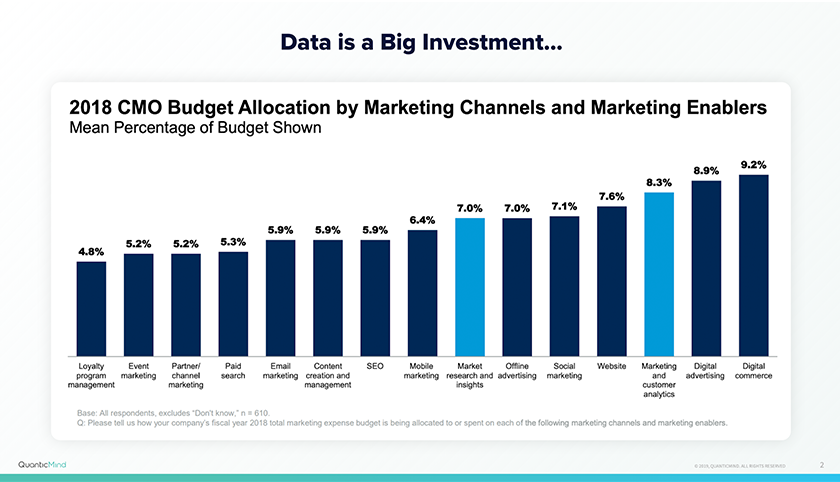
This investment has increased YoY and a majority of the decisions coming from business leaders are data-driven based on analytics.
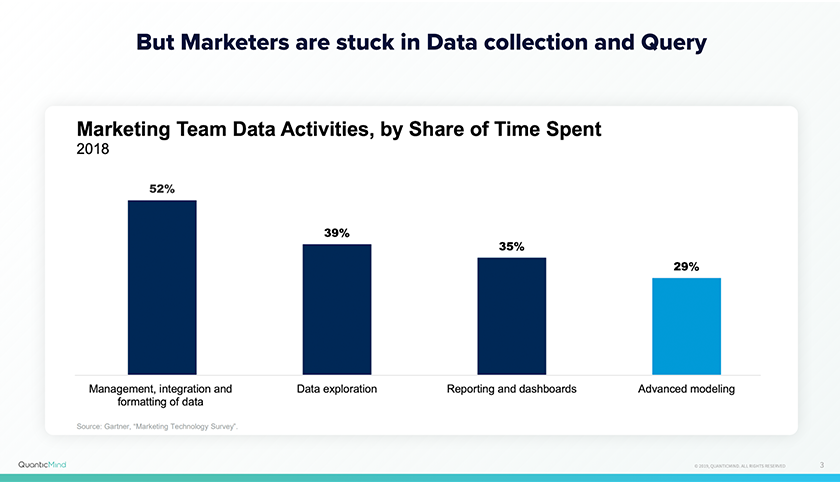
However, and many of you can relate to this fact, marketers are mostly stuck in data collection and queries. Data analysts and scientists are spending their time in the management, integration, and formatting of data or even mundane tasks like creating dashboards and reporting. Only 29% of their time is spent on data advanced modelling.
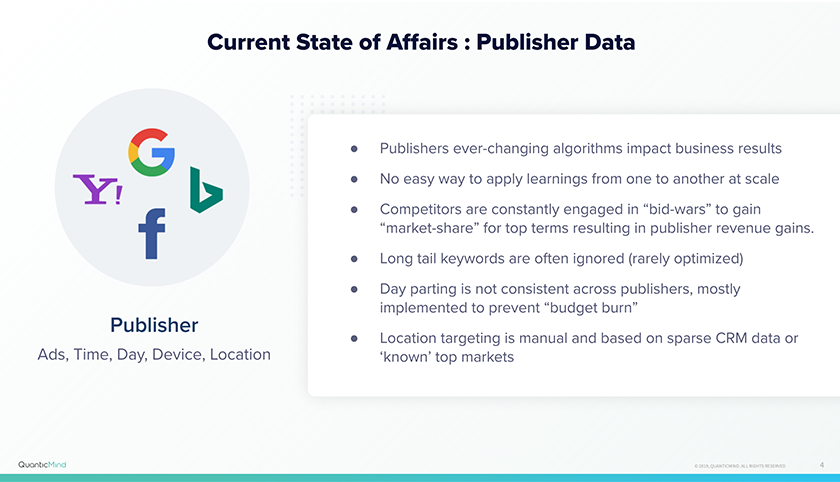
If we look at the current state of publisher data, there are obvious challenges ahead of us. Namely;
If you look at all of the customer-level data that you’re processing currently, you’ll no doubt have some powerful data on repeat purchase value, call surge and capacity, and lifetime value or average order value. To beat out your competition, you’ll want to be smart about your advertising strategies with all of this data.
If you look at contextual data, there are so many signals available out there regarding how your prospects are finding you - think about device, location, time of day, day of week, weather, etc.
The real question, then, is how do you integrate all of this rich data coming from various sources and channels to enhance your advertising and marketing efforts. Many of you may say a “Customer Data Platform” is the solution! And many of you may have been working with a CDP vendor. Raise your hand if you have one or are talking to a CDP vendor currently?
Well, I can’t see a show of hands here but just having all of this data in silos doesn’t make it usable. Smart advertising is all about integrating this data and modelling it to get the best results from your advertising efforts, and that’s what QuanticMind has been helping customers with.
We’ve been integrating all of this data even before the term CDP was born 🙂
But how do we use all of that unified, integrated data for optimization?
This flow chart simply captures how we apply all of your rich data to achieve a potential use case or business application. I call it smarter advertising.
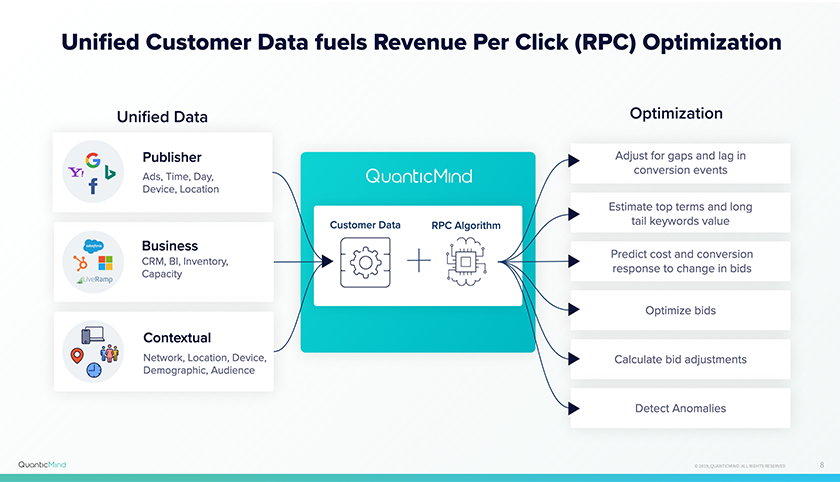
Our platform processes all of these online and offline data signals and calculates the revenue for each of your keywords. It then optimizes bids based on said revenue. We call it revenue-per-click optimization. The result is peak performance. And I am borrowing this line from our co-founder Brian Bird: “Peak Performance is a beautiful thing”
My father used to work at a Radio station. Growing up, I used to hate the holiday season. While all my friends were with their fathers, mine was busy as it was the time everyone would tune-in to listen to him on the Radio (He was a popular host and had a fan following back then).
I couldn’t automate his busy work but maybe I could help you automate your busy work so you can enjoy more time with your family this holiday season.
I can go on and on as I’ve been doing all of this manually at some point in a very restricted way before using QuanticMind. I joined this company founded by data scientists and digital marketers to provide my fellow marketers with a better way to achieve superior results. Please cut down on the busy work and focus on business strategy and results.
We would love to tell you all about the beauty of our platform and smarter advertising. Request a free consultation now.
At Centro, we know that keeping up with the trade pubs and latest trends can be tough and time-consuming. To make that easier, we’ve compiled all the articles, reports, and other bits of awesomeness you may have missed, but should definitely read. Enjoy our latest list below!
RTB RIP? The Writing Could Be On The Wall For Real-Time Bidding In Europe [:05]
RTB is in the center of debate for the future of programmatic advertising. With GDPR and companies having to update how they collect consent for data processing, the industry is facing a crisis on how to incorporate it into RTB while still being within regulations. Some believe that if you take data out of the equation, RTB is still possible, while others believe that the two go hand in hand.
How Ad Tech Is Adapting To The Pivot To Privacy [:04]
Programmatic advertising is changing with the threats from regulators, platforms and browsers impacting the way user data is collected. Amongst some of the predicted changes include the demise of the third-party cookie, dominant players converging like SSPs and DSPs, and a future in an authenticated web.
How We Can Restore Trust in Advertising [:03]
Marketing Land interviews the CEO of French ‘drive-to-store’ marketing platform Teemo about how transparency can thread the digital needle between irrelevance and creepiness.
YouTube Taps Machine Learning to Serve the Best Contextual Ads for Each User [:03]
YouTube is introducing a new way for marketers to upload and manage their various video campaigns, leveraging machine learning to automatically serve “the most efficient combination” of ad formats at the individual user level.
What the Taboola-Outbrain Combination Means For Publishers [:03]
What does $250 million cash plus 30% of equity in a combined company get you? Well that’s what Taboola is paying to acquire Outbrain in what may be one of the longest discussed M&A events in adtech history to create a content recommendation monster. The promise of the two content recommendation companies’ platforms is more efficiency for advertisers looking to buy sponsored links across the web, though some publishers are concerned around the quality of the recommendations.
Google Ad Manager will be rolling out first-price auctions by the end of September and since then, publishers have seen CPM increases between 9% - 50% as a direct result. Any type of transition of this size will initially see a price fluctuation, however, with bid shading, this is thought to even out over time.
Google Play Pass Launches With 350+ Premium Apps And Games [:03]
Google is launching its own take on subscription-based access to premium mobile games and apps. This will be $1.99 for the first 12 months and then will be $4.99 after the first year. It is unclear what advertising opportunities will be, however, the potential is huge with subscriber data.
Experiential Retail Encourages Greater In-Store Shopping for Consumers This Holiday Season [:04]
In-store shopping is seeing a resurgence as retailers continue to provide consumers with convenient and exciting purchase experiences. And with the holidays approaching, it’s important for retailers to evolve their in-store strategies to encourage repeat shopping.
Pinterest’s Lens Can Now Recognize 2.5 Billion Home and Fashion Objects [:03]
In the 2 years since it’s launch, Pinterest’s AI-powered computer vision discovery tool has been enhanced to more easily perform searches from photos. And now users will begin seeing shoppable Pins—Pins with products, pricing information, and a direct link to checkout—directly into visual search results. The 2.5 billion objects that Lens can recognize range across home and fashion Pins, including tattoos, nails, sunglasses, cats, wedding dresses, plants, quilts, brownies, natural hairstyles, home decor, art, food, and more.
There are a multitude of ways a paid search campaign can be improved, and the avenue one should choose depends entirely on the desired business outcomes. However, the one metric that I have found to be most powerful is efficiency - knowing who to advertise to and when to do it. This “efficiency” can be significantly improved through the bid adjustment tools, which can effectively help target a key demographic to better meet the goals of a given campaign. It can help granularize one’s audience, advertise specifically to each segment, and ultimately eliminate waste by excluding audience members who are unlikely to convert or contribute towards the overall campaign goal.
Before getting into the technicalities of what bid adjustments are and what types are commonly used, I’ll first build some intuition. Everybody is familiar with TV ads - they can be a great building block to understand bid adjustments and how they are beneficial. As a basic example, think about when companies choose to air their ads. Children’s toy companies like Toys ‘R Us (R.I.P) will likely choose to air their ads on Saturday afternoons between cartoons. This is because they know their key demographic - young children - will be engaged and receptive at this time. You would never see a Toys ‘R Us ad at 3:00 am. Companies that primarily target men, like Gillette, will try to air their ads during sporting events. This is because the primary consumers of sports content are males - the demographic these brands are trying to reach. Conceptually, bid adjustments do the same thing in the SEM space.
Per Google Ads Help, a bid adjustment is a percentage increase or decrease in your bids that allows you to show your ads more or less frequently based on where, when, and how people search. A bid adjustment simply means raising or lowering your bid based on when you think it would be more or less valuable for your ad to be seen. There are a few metrics that this “value” is based on which coincide with the different types of bid adjustments.
Location bid adjustments
This does exactly what one would expect - it adjusts bids based on the relative value of a location to a campaign. The location adjustments can be based on country, state within the United States, and, at the most granular level, metropolitan areas (Metropolitan Areas). metropolitan areas are regions of the United States used to define television and radio markets. metropolitan areas are centered on large, metropolitan cities and are named as such. They also encompass suburbs and smaller towns further out of the cities.
Let us consider the New England Patriots as another example. The Pats would want to show their ads in New England since someone in that area is more likely to buy a jersey or tickets to a game. To accomplish this goal, they should have a location bid adjustment to bid up searches in this area. Everybody else hates the Patriots with a burning passion and would be unlikely to convert on their ads in any form whatsoever. The Patriots would thus want to bid their ads down in the other 49 states in order to prevent money being wasted on ads that do not generate revenue. All the money that they save from bidding down ads can be used to pump up their footballs. While this example is basic, and a bit extreme, it explains why location bid adjustments can be helpful.
Device bid adjustments
Again, the name gives it away - this type of adjustment modifies bids based on the device that is being used to interact with the ad. Device bid adjustments can be split by device type and not between device types. For example, iPhones and Android phones don’t have separate device mods, they both come under “Mobile devices with full browsers”. Macs and PCs would both go under the same category: “Computers”. For the sake of rounding out the examples, I’ll also say that all tablets, such as iPads and… it’ll come to me… I got nothing sorry. iPads will go under the device category of “Tablets with full browsers”. This is what I meant when I said that device adjustments cannot be implemented for different subsets of the same device.
“So, when should I use device bid adjustments?”. Great question. The short answer is to use your data and figure it out. Does your business get a lot of traffic on mobile? This can be the case with low price, high volume items or quick local services. A simple example is that of a restaurant - perhaps the restaurant’s primary source of traffic is mobile impressions that come from people searching on the go, or conversions in the form of a phone call. This restaurant would want to bid up mobile searches in order to get more traffic. Another example could be a car dealership. People might be unlikely to buy an expensive item like a car on their phone or tablet which is why one might consider bidding down mobile ads. However, here it is important to note that mobile ads might drive impressions that result in conversions on computers. This example illustrates that device adjustments can often work in conjunction with one another, and one must be careful when integrating them into the overall campaign.
Time of day bid adjustments
Fairly intuitively – these adjustments allow you to change your bids based on the subjective value of a particular time of day to your business. However, this has limitations. One cannot simply adjust a bid for every minute or every hour of the day. Google lets you make six bid adjustments per day. That’s 42 a week, 180 a month, 2190 a year, and for all you extra curious folks 173,010 over the average human lifespan. This is important because it means that hours need to be grouped, or “bucketed”. Grouping hours in a way that optimizes performance can be very tricky. At a high level, one would want to use time of day adjustments to bid up hours that historically have higher intent-based traffic, which can be measured as conversions. One would also want to bid down hours with low intent-based traffic.
A good example of this would be retail. Retail businesses would want to bid up their ads late in the morning and early in the afternoon because this is a prime time for conversions. Customers searching for retail stores at this time would be the most likely to actually visit the store and convert. Retail locations would want to bid down hours later in the day since the ad spend would not result in conversions since the store would be closed. The impression might be important in acquiring a conversion for the next day which is why the business should not bid their ads down too far, but they should prioritize peak hours. This is a simple example of time of day modifiers in action.
Remarketing adjustments
If a potential customer has already visited the website of a business but did not convert, they get placed on a remarketing list. Remarketing adjustments are most often used to bid up ads for people who did not convert on a previous visit to the website. This is applicable to almost any business and I don’t think it needs an example to illustrate what it represents.
There are simpler bid modifiers to account for age, gender, and other demographic information, but rather than going into detail on those, let’s discuss why bid adjustments are useful. First and foremost, they help increase cost efficiency and performance. By cutting costs in lesser-performing conditions and driving conversions in more efficient conditions, the overall performance of campaigns will improve. Bid adjustments help businesses market to their desired audience at a more granular level and prioritize audience members more likely to convert. They can increase efficiency by dictating when and where the ads are seen and by whom. Overall, bid modifiers, if implemented correctly, will greatly improve the performance of an SEM campaign.
~
To learn more about how you can become more efficient with bid modifiers, connect with our digital media experts today.
‘Ask the Expert’ is a series that breaks down the tools, tech, and trends you’ve been hearing about in the trade pubs and around the office. We ask our in-house experts the tough questions and write up the answers in bite-sized pieces for your reading pleasure.
This month’s topic? Customer Data Platforms (CDPs) and Data Management Platforms (DMPs). We brought in Centro’s VP of Performance Analytics and Ad Operations, Zach Moore, to give us the breakdown.
What’s a CDP? What’s a DMP? What do they do?
A CDP, or Customer Data Platform, and a DMP, or Data Management Platform, can be complimentary to each other—but ultimately exist to accomplish different objectives for marketers.
A CDP contains data attributes for known and unknown customers: Names, addresses, purchase histories, product preferences, etc. These data points are aggregated from multiple systems, matched to profiles, and ultimately, used to create personalized touchpoints.
A DMP, on the other hand, operates anonymously and utilizes browser cookies. DMPs exist to segment audiences, gain insights into specific actions, and facilitate targeting these users anonymously.
What’s the primary difference between the two platforms?
A CDP typically contains PII (personally identifiable information), whereas a DMP is not usually permitted to store this type of information.
What’s an example of how a marketer would use a CDP or a DMP?
Let’s say a brand wanted to launch a targeted email campaign to their e-commerce customers. Using a CDP, they can utilize different messages and offers based on their customers’ predicted lifetime value (LTV).
They can target their high LTV customers, who are more likely to keep spending, with an e-mail that contains a discount or special offer on a big ticket item. Low LTV customers, who are less likely to spend a significant amount of money, can be targeted with an email that features moderately priced accessories or an alert about an upcoming sale.
Let’s say the same brand is attempting to get prospective customers down the purchase funnel, but they experience a drop-off right before conversion. By utilizing a DMP, the brand can map out the prospects’ journey throughout their website and build rules to collect and segment the prospects—to target them more efficiently and gain better insight into their path.
These user segments can be activated within ad buying platforms. For example, the brand can target those users with an ad to remind them that they still have items in their cart, or retarget them with variations of similar products that they’ve already viewed.
What should a brand keep in mind when considering either a CDP or a DMP?
Both are major investments for any marketer and should be carefully considered. The marketer should have a firm use case for each platform, as well as solid buy-in across the organization early on in the process. It’s likely that various teams will need to play a part at some point. Everyone in the organization should be aligned around the business use case, and metrics should be established up front to gauge success.
For CDPs in particular, organizations need to input “clean” data in order to receive actionable data as an output. There should be a large emphasis on data hygiene in order to start the process correctly. If this is a new concept and your data is a bit of a mess, stakeholders will need to be realistic about short- and long-term goals.
Along these lines, it’s important to ask yourself: When was the last time you audited your CRM data? Are these customers still active? Have they moved? Be honest with how fresh your data is.
For both CDPs and DMPs, create a plan for how to use your data and a clear path to customer segment activation. In the case of media activation, ensure your partners can ingest what you’re sending them.
When it comes to DMPs specifically, stay in lock step with your dev and/or IT teams, to make sure that the necessary data points are surfaced in your website’s data layer, or available through the existing tag management solution. If they are not readily available, extra development will be needed to bring them to the forefront.
How does Centro work with clients who currently have, or are looking to obtain, either solution?
Our clients can bring Basis in-house or utilize our managed services option to easily activate segments programmatically. In situations where neither of these options are a perfect fit, Centro meets clients where they are to create custom solutions.
Not sure where you stand? Connect with us to learn more!
Social media platforms like Facebook, Instagram, and LinkedIn rely on audience data to help businesses target their aids. But it’s equally relevant for the search ad landscape. Many search advertisers continue to largely ignore audience targeting options, rather than focusing on keyword bid optimization alone. Using audience targeting for PPC makes it possible to focus on users who are part of your potential customer base. Here’s how.
Keywords have long been the most important tool advertisers use for paid search ad targeting. It was once in the name. “Google Adwords” referred specifically to the role keyword-targeting played in advertising success. That said, audiences have always been an important aspect of what kind of keywords businesses add to their lists. To choose the most valuable keywords to target, you must understand the people (audiences) that use them as search queries.
Audience intent is the driving force behind what kind of phrases users put into the search engines. Yet there can be significant variation in why different people type the same keywords into a search engine. That’s where audience targeting helps a great deal.
Say, for example, someone types “Law offices Seattle” into a search engine. The assumption might be that the person is looking for a lawyer. But what if they’re actually looking to open their own law office in Seattle? Using behavioral and other audience data to separate these users is a valuable way to ensure your ads only appear for the most relevant audiences (as well as queries).
In 2018, Google rebranded its PPC advertising platform from Google Adwords to Google Ads to de-emphasize the role of keyword targeting. However, that doesn’t mean advertisers today shouldn’t be concerned with keywords. Keywords still play a very valuable role in reaching target audiences. Now it’s also important to consider the true value of audience data to improve ad reach and performance.
Audience targeting on its own comes with certain challenges. When using platforms like Facebook or Instagram that rely solely on audience attributes for targeting, there’s no way to know if all the people who see your ads are truly part of your target customer group. Just because someone is in a certain age group, has certain interests, or is near a certain location doesn’t mean they want to buy your products right now.
Paid search advertising is able to avoid this issue by using keywords and audience targeting in unison. The types of phrases people type into a search engine can indicate an intent to purchase. And their demographic profile can help you understand why they’re using those specific search phrases in the first place. Using audience and keyword targeting in combination ensures you prioritize the most relevant audiences at a time when they’re likely ready to make a purchase decision.
Today Google Ads offers more audience targeting options than most marketers are prepared to keep up with. They include:
Here are some of the different ways search advertisers can use audiences to better reach leads and improve campaign performance:
Behavioral-Based Audiences
Many of the aforementioned audience types are based on different kinds of behavior. Certain actions people take can indicate their interests and point in the sales funnel, which you can then use to segment and prioritize different users.
With Google’s remarketing lists, you target users based on actions they made on your website, such as visiting certain pages, filling out a contact form on your site, browsing your site for a certain length of time, etc. With YouTube users, you can target audiences that have watched your videos. And with App users, you can target people who’ve downloaded your apps.
Targeting audiences based on behaviors helps ensure you use the right marketing message to match their point in the sales funnel. Say, for example, you're targeting users that have already filled out a contact form on your site but haven’t converted into paying customers yet. Your PPC ad could then focus on setting your business apart from the competition (middle-of-the-funnel) instead of illustrating what your product is about (top-of-the-funnel).
In-market Audiences
In-market audiences is a targeting feature that reaches potential customers while they’re actively browsing content related to your product/services. It’s incredibly valuable to reach people who are actively browsing, researching, or comparing different products online. Most people turn to search engines to get quick information so they can make purchase decisions. Targeting audiences after they’ve gone through this critical search phase often leads to your ads reaching them after they’ve already bought.
Using in-market audiences is also particularly valuable because they rely on third-party data to categorize prospects into interest groups. There’s a variety of options to choose from, so you can usually find an audience group that perfectly matches your audience. Some of the available in-market audiences include:
Google’s in-market audiences for search have been around for a few years. Bing launched their own version of in-market audiences in 2018. Yet few advertisers take advantage of this targeting option to reach audiences that are ready to buy. Because it’s such an underutilized audience targeting category, it’s also possible to get significant returns when you use it.
Remarketing Audiences from Prior Ad Campaigns
There are many ways to build remarketing audiences for your advertising campaigns. One option is to use UTM tracking codes. UTM tagging allows you to effectively market to your audiences across channels like Facebook, LinkedIn, and Google. Prospects are much more likely to convert if they are exposed to your brand on more than one advertising platform. And it’s possible to use UTM tagging from social media advertising to target audiences on Google search.
Say, for example, you want to target people on Google search who previously converted through your Facebook ads. You can tag URLs from your best Facebook ads with UTM tracking parameters then create a corresponding remarketing list in Google Analytics. You can now use this as a remarketing list for search ads (RLSA) to target these users more aggressively. This increases your chances of reaching high-quality leads in the process.
Unlike with in-market audiences, these are people who were exposed to your brand on social media before expressing purchase intent. But once they turn to search engines to learn more about and compare products, your ads will show up. This ensures you target these micro-moments when users switch from passive browsing to actively searching for information on products and services.
First-Party Data with Customer Match
Customer Match is a valuable advertising tool because it has its own unique features. In-market audience targeting relies on third-party data to help businesses broaden their reach to new customers. Customer match instead relies on first-party data from your own business to help you identify and target audiences with Google Ads.
Customer Match allows you to utilize your own data to engage current customers on Search, YouTube, Display, and other verticals. It also uses the information that your current customers have shared with you to help you discover and target new customers like them.
For example, you can use data from your customer relationship management (CRM) platform to target previous customers with upsell opportunities on search. Using Similar Audience targeting based on your Customer Match audiences, you can also target audiences similar to your remarketing lists on YouTube, Gmail, or Display.
Location and Demographic Targeting
Location targeting has been around for a long time before Google started even pushing towards more audience targeting. Adjusting your bids based on performance in certain locations or with certain demographic groups can significantly improve ad performance and help you better allocate spend.
Say you run a chain business with locations in five different metropolitan areas. You could distribute your ad spend evenly across them with a constant cost per click. But looking closely at your performance data, you discover three locations drive more sales from ad clicks and conversions. Redistributing your ad spend to maximize the value of your most popular areas can make it easier to reach your revenue goals.
At the same time, you may find that targeting a specific age group, gender, or other demographic has a similar effect on performance. Leaving all other audience targeting options aside, simply increasing bids for specific locations and demographic factors leads to significant options to improve campaign performance. The challenge is discovering all these opportunities and making appropriate changes to maximize the value of audience data.
The above examples are just a few ways that audience targeting can be very valuable for PPC advertisers today. Once you start using audiences to their full extent, the positive impact on campaign efficiency and effectiveness continues to grow.
This is especially true when utilizing an advanced automated bidding technology like QuanticMind by Centro. Using artificial intelligence and machine learning, it’s possible to calculate the precise bids you need to target audience groups, based on their expected revenue-per-click (RPC).
Say, for example, a business has a number of remarketing audiences segmented based on specific behaviors, such as:
Even a modest business can come up with 10 or 20 relevant remarketing audiences to target based on behavior. But they often don’t have enough data and internal data analysis capabilities to assign CPC value to them all.
Automated bidding technology uses historical performance data and the current bid landscape to determine your CPC for each micro-audience. This not only improves campaign performance but also reduces wasted spend targeting less valuable audiences with broad bid adjustments.
The majority of businesses today aren’t taking advantage of the targeting potential that specific audiences bring because they don’t have enough internal processing power. Advanced audience targeting paired with automated bidding opens up significantly more opportunities to benefit from this.
It’s not enough to create a remarketing list or try out one of the many audience targeting options available on Google Ads. Performance marketers need to utilize nuanced audience characteristics to make changes and improve campaign performance.
In the long run, search advertising platforms like Google and Bing will continue to encourage advertisers to use more audience targeting options to optimize their campaigns. Forward-thinking businesses should use the wealth of audience data available to maximize campaign performance and stay ahead of the competition.
Real-time bidding has been a driving factor in the growth of the digital media ecosystem. As the industry continues to evolve, media buyers are expected to navigate not only guaranteed direct media buys, but biddable media as well.
Stop gambling with your media dollars and start winning with smarter bidding strategies.
Location-based advertising has entered a new era. For years, advertisers focused on leveraging the most granular location data, often ignorant of how it was obtained. Today, however, the landscape has changed.
Regulators expect certain standards to be met, requiring advertisers to uphold the latest policies on privacy and transparency.
Listen in, as we chat with Lawrence Chan, EVP of Data Ecosystems at mobile intelligence company, Cuebiq, who sheds light on how advertisers can use location data in impactful ways while still observing new standards of privacy compliance.
The modern landscape of performance marketing has evolved quite considerably over the past decade as emerging technologies powered by artificial intelligence have pushed the boundaries of how brands can effectively market their services. This transformation stems principally from the sheer amount of data now available to organizations - both emerging and established - across every industry. Digital advertising teams of today are faced with two options: either they take on the mammoth task of tapping into that data to improve operational efficiency, or, they simply ignore it and run the risk of losing market share to their respective competitors.
This new wave of data is largely attributed to changing cultural and behavioral patterns that are permeating contemporary society. The chief example of this is our increasing use of multiple devices on a day-to-day basis. Each one of our laptops, smartphones, and tablets are generating data that can be captured, stored, analyzed, and then leveraged by companies that have the capability of doing so. In a study conducted by Business Insider back in 2016, it was estimated that by 2020, more than 34 billion internet-connected devices will be installed globally - to put that into some sort of context, that is more than four devices for every human on the planet. Together these devices will truly revolutionize many aspects of our lives both at home and at work.
So, with such vast swathes of information comes the question of how marketers can decipher meaningful insights from all the noise. How is it possible to manage every online touchpoint and create a seamless brand experience for consumers throughout each stage of their journey? The good news is that there are plenty of solutions and strategies designed to help manage all of this. One of the most powerful weapons in an advertiser’s arsenal is dedicated audience targeting - the practice of segmenting desired customers by defined characteristics and then hitting them with relevant messaging at precisely the right time in the buying cycle. If done effectively, this tactic can bring numerous benefits including a lift in conversion rates, a reduction in cost per acquisition (CPA), and an increase in customer lifetime values (CLTV).
In an era when online marketplaces have never been more crowded and consumers have never been more demanding with brands, it’s essential that digital advertisers no longer throw a blanket over audiences. Those days are long gone. Instead, they must be cognizant of the fact that each member of their audience has a specific set of attributes that will influence how they should be targeted.
It all sounds very complex, doesn’t it?
Marketing audiences offer a wonderful abundance of insights to help maximize the performance of campaigns across your entire portfolio. To begin, we suggest a few techniques you can adopt to take advantage of the power of audience data:
Google offers a wealth of information about the users visiting your website through both organic and paid efforts. Paying close attention to the demographic makeup of your site traffic can help you build better, more defined audience profiles which will ultimately lead to improved targeting.
Once you’re able to paint a clear portrait of your target demographics, you can easily use this information to tailor your ads. There are currently eight major audience types advertisers can use to target and drive peak performance. Due to this large number, few PPC managers have a full understanding of how to utilize them to their potential. The list includes:
Rather than focusing solely on specific customer types over others, it’s possible to target large categories of search users while still prioritizing certain segments that are most valuable for your business. This is done through targeted bid adjustments. Doing this strategically can lift the efficiency of your spending and increase your returns.
While all these options undoubtedly represent great opportunities to move the metaphorical needle in your favor, they do come in tandem with a set of challenges concerned with implementation and optimization. These include:
Having this bounty of targeting tools makes it difficult to determine exactly how much you should spend on different audiences. Take location targeting, for instance. A business can target several locations with their ads, assigning a constant cost-per-click (CPC), but if you look at how much revenue you derive from clicks in certain regions, there will be some noticeable variations. If you maintain a constant (CPC) across the map, you can end up losing money in certain locations while simultaneously missing out on peak performance in others with a higher revenue-per-click (RPC).
Most advertisers feel it’s a question of which audiences they should or shouldn’t spotlight. In reality, though, a wide variety of audiences can have some amount of value when it comes to driving conversions and reaching business goals. For example, let’s say new site visitors show an RPC hovering around $2 while Add to Cart (PLAs) have an RPC over $10. This doesn’t indicate that bidding on new site visitors isn’t worthwhile. It simply means you need to allocate spend toward each audience based on the revenue value they provide. Targeting should always be based on the ROI of each audience. There are locations, audiences, devices, times of day, days of the week, and other dimensions to segment and assign value to.
The volume of bid calculations and their accuracy are just two of many considerations to make for your campaigns. Other questions that may arise include:
In order to make the most of all the targeting options at your disposal, employing automated technologies to help with the workload is an absolute necessity. Here's why.
In the process of calculating bids, it’s common to be considering factors such as location, device, time, and seasonality. They alone, however, do not represent the end of relevant data points that can influence bidding decisions. Businesses may also want to take into account offline customer data, CRM data, inventory, transactional and POS data, or other engagement data to improve targeting and bidding. That’s where solutions backed by artificial intelligence come in. Through the use of third-party automated bidding technology, it’s possible to unify all significant data to make more efficient and effective bidding decisions.
Unified data is just the first step. After first building predictive models and using optimization algorithms to determine bids that maximize financial objectives, it’s possible to consider location, device, schedule and audiences before automatically calculating bid adjustments. By using the technology, you can be empowered to take advantage of thousands of unique bid adjustments based on targeting data and other dimensions.
Automated bidding technology also helps glean new insights when data is scarce. Advertisers can target many highly specific keywords or audiences. But there is often very little data illustrating the true revenue value of these low volume groups. Automated bidding technology can use machine learning to accurately predict their value, making robust bids and bid adjustments accordingly.
Whether you’re managing the performance marketing campaigns for a small business or an established enterprise, understanding exactly who you are targeting and knowing precisely when to target has never been more essential. Successfully reaching, engaging with, and then converting consumers in the online environment has never been more testing than it is today.
Our people are a large part of what makes Centro such a great place to work. We’re excited to introduce you to some of Centro’s most interesting people in our newest blog series, as they share their ‘Centro stories’ and a variety of experiences that have impacted their work and life.
As SVP of Program Management and Operations, Joanna Vahlsing creates a variety of systems, frameworks, and processes to help Centro reach its strategic goals. Her agile, collaborative style allows Centro to continually grow in efficiency and speed.
Read on to learn how Centro’s leading process and operations engineer transforms big ideas into big accomplishments.
Clare McKinley: Can you give us an example of a system, framework, or process you’ve created, and the impact it’s had on Centro?
Joanna Vahlsing: One high-level framework that I’m proud of is integrating operational goals into Centro’s annual plan. Every year we create an annual plan, which focuses primarily on revenue goals and expense budgets. This year, in addition to setting revenue goals, we set operational goals as well.
The framework started with gathering departmental goals from the entire leadership team. Understanding and aligning these goals ensures that we’re set up to enable each other, and also makes any dependencies across departments very clear (situations where, in order for one department to achieve a particular goal, it needs a deliverable from a different department).
In addition to rolling out operational goals, we have an operational meeting every six weeks to review our progress against those goals and make any necessary changes along the way.
CM: You’re known for taking the Agile process and putting it to work throughout Centro. What do you find valuable about the Agile process in terms of program management and operations?
JV: In general, the premise behind Agile is that it’s the most adaptable framework for getting things done. It’s a methodology that reminds us that sometimes it’s OK to deviate from the plan. That also aligns well with Centro’s culture—we’re a team that chooses to embrace change, rather than resist it.
Centro’s method of providing solutions is actually informed by Agile—when we first rolled out Basis, the primary solution offered was our self-service option. As we collected feedback from the market, we realized we needed more flexibility and optionality. We began offering flexible solutions between managed services and self-service, in order to meet customers where they are. If we hadn’t been working from an Agile mindset, we wouldn’t have been able to pivot and realize those opportunities.
CM: You’ve successfully increased cross-departmental collaboration at Centro. What strategies have worked for you in terms of this achievement?
JV: Well, there are many ways to do it wrong (laughs).
For starters, when we kick off cross-departmental projects and initiatives, we include clearly stated and measurable goals. A goal creates a reason why participation and collaboration are needed.
Another strategy that’s worked for me is inviting feedback. I regularly invite people to poke holes in my ideas. I’m up-front about asking, “Where do I have blind spots? What am I missing?” That creates a layer of ownership and commitment to whatever we’re working on.
CM: How would you characterize your leadership style?
JV: I strive to be a coach, a servant leader, and an enabler. I have high trust in the folks on the team, and fully expect them to go until I tell them to stop. I create a lot of autonomy within the team—and a lot of trust.
CM: What do you find most challenging about your work? Most rewarding?
JV: Well, I don’t like to be bored, so I love challenges. I love when someone says, “It would be really great if we could…” Cool! Let’s figure out how to make it happen. No challenge is too crazy.
The most rewarding part of my job is being part of a winning team. I’m really proud of the work everyone is doing. I love where we’re at right now—the accolades we’re getting, the uptick in Basis usership—it feels like the culmination of everything we’ve been working for over the past five years since I joined Centro.
What I love even more is that it’s not at all that we’re “peaking.” Things are going to keep getting better. We have an amazing future ahead of us.